Creating and Navigating DOM Trees
XML
An XML element has the form:
<tag attribute0="value0"
attribute1="value1" ...>
content
</tag>
Both attributes and content are optional.
An empty element has attributes but no content. It has the form:
<tag attribute0="value0" attribute1="value1" .../>
The content of an empty element may be a sequence of elements or text or a mixture of elements and text.
An XML document consists of a single root element.
For example, the file memo1.xml contains the following root element:
<memo date="2009-7-4">
<from title="Mr">Smith</from>
<to>Jones</to>
<re subject="Monday"/>
Happy Birthday!
</memo>
This is an example of a mixed content element. The memo node has a single date attribute. Its content consists of three elements and some text.
The re element is an example of an empty element. It has an attribute but no content.
DOM
Parsing
An XML parser parses an XML document into a tree. For example, the memo1 document parses into a tree of the form:
/
<memo>
<from>
title
"Mr"
#text
"Smith"
<to>
#text
"Jones"
<re>
subject
"Monday"
#text
"Happy Birthday!"
The format of this tree is specified by DOM, the W3C Document Object Model standard.
The top node of the tree, /, is called the document node. It has one child, <memo>, the root node. The <memo> node has four children, etc.
Attribute nodes are in italics. Text nodes are named #text.
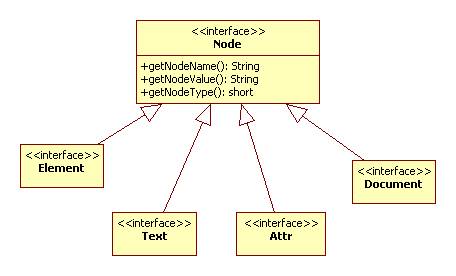
Every node has a name, value, and type.
Node types include element, text, document (i.e., /), and attribute. (There are a few others).
The name of an element node is its tag and the value is null.
The name of an attribute node is the attribute's name. The value is the attribute's value.
The name of a text node is #text. The value is the text itself.
Java provides interfaces that correspond to these node types:
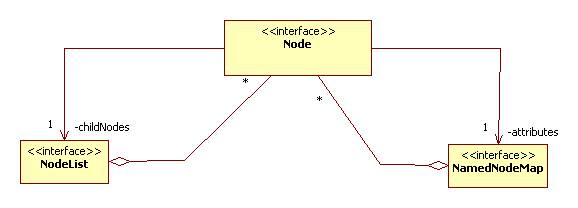
Every node has two associated lists: a list of content nodes and a list of attribute nodes:
Example
The file DOMUtils.java
shows some basic JAXP features.
The getDocument method shows how to parse an XML document and return the document
node:
public static Document getDocument(String xmlFile) {
Document doc = null;
try {
DocumentBuilderFactory
factory =
DocumentBuilderFactory.newInstance();
//obtain parser:
DocumentBuilder builder =
factory.newDocumentBuilder();
// parse an xml document
into a DOM tree:
doc = builder.parse(new
File(xmlFile));
} catch(Exception e) {
System.out.println(e);
}
return doc;
}
Accessing Attributes
The displayAttributes method shows how to access the attributes of an element node:
public static void
displayAttributes(Element node) {
NamedNodeMap aNodes =
node.getAttributes();
for(int i = 0; i <
aNodes.getLength(); i++) {
Attr attribute =
(Attr)aNodes.item(i);
System.out.println(attribute.getName()
+ " = " + attribute.getValue());
}
}
Note that NamedNodeMap is typed as a list of Node even though the members are actually instances of the Attr subtype. Hence it is necessary to cast them to this type in order to access the name and value.
If we know the name of the attribute, then we can directly access its value using the getAttribute method. For example:
root.getAttribute("date"); // returns 2009-7-4 for memo1 root
Accessing Node Name, Value, and Type
Every node has name, type, and value. Here's how to access them in Java:
public static void
displayNode(Node node) {
System.out.println("name =
" + node.getNodeName());
System.out.println("value =
" + node.getNodeValue());
System.out.println("type code =
" + node.getNodeType());
}
Accessing Content
The displayContent method shows how to access the content nodes of a node:
public static void
displayContent(Element node) {
NodeList children =
node.getChildNodes();
for(int i = 0; i <
children.getLength(); i++) {
Node child = children.item(i);
displayNode(child);
System.out.println();
}
}
Note that DOM does not intermingle the content nodes and attribute nodes.
Test
Here's a little test harness that parses memo1.xml:
public static void main(String[] args) {
Element root =
getRoot("memo1.xml");
displayAttributes(root);
System.out.println("+++++++++++++++++++++++");
displayContent(root);
}
Here's the output it produces:
date = 2009-7-4
+++++++++++++++++++++++
name = from
value = null
type code = 1
name = to
value = null
type code = 1
name = re
value = null
type code = 1
name = #text
value = Happy Birthday!
type code = 3