OpenApp: A simple
container-component system
User-defined components are managed by the OpenApp container:

Interfaces
An interface has a name and a
set of methods.
Normally a method would consists
of a name, return type, and list of parameter types, but OpenApp assumes all
methods take an array of strings as input and return a string:
String someMethod(String ... args); // note we are using varargs
Components
All user-defined components
must extend the Component base class.
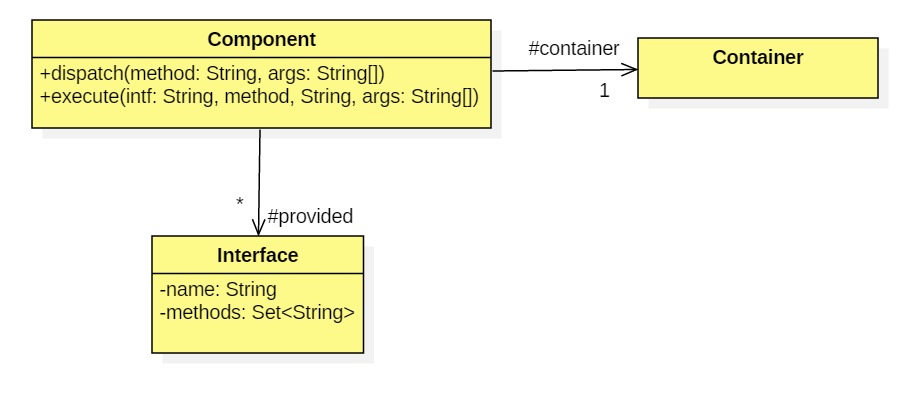
The Component class provides an execute method. The execute method takes the name of an interface, the name of a method in that interface, and an array of arguments:
public String execute(String intfName, String method, String ... args) throws Exception {...}
It uses the interface name to search the container's white pages table for an appropriate component, then invokes that component's dispatch method:
provider.dispatch(method, args);
Container
The container inherits console functionality from a reusable Console class and maintains two tables: white pages and yellow pages. Yellow pages matches provided interfaces to the components that implement them. White pages matches names of interfaces to the interfaces themselves.

Example
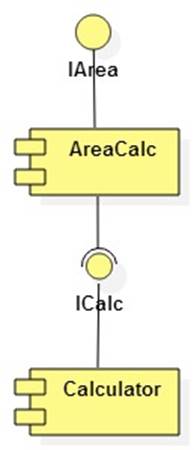
Assume an area calculator component provides methods for calculating the areas of circles and triangles (IArea). But it requires methods for doing simple arithmetic (ICalc). These are provided by a calculator component. Here's the situation in the form of a UML component diagram:
To use OpenApp developers of each component extend the container package's Component class:
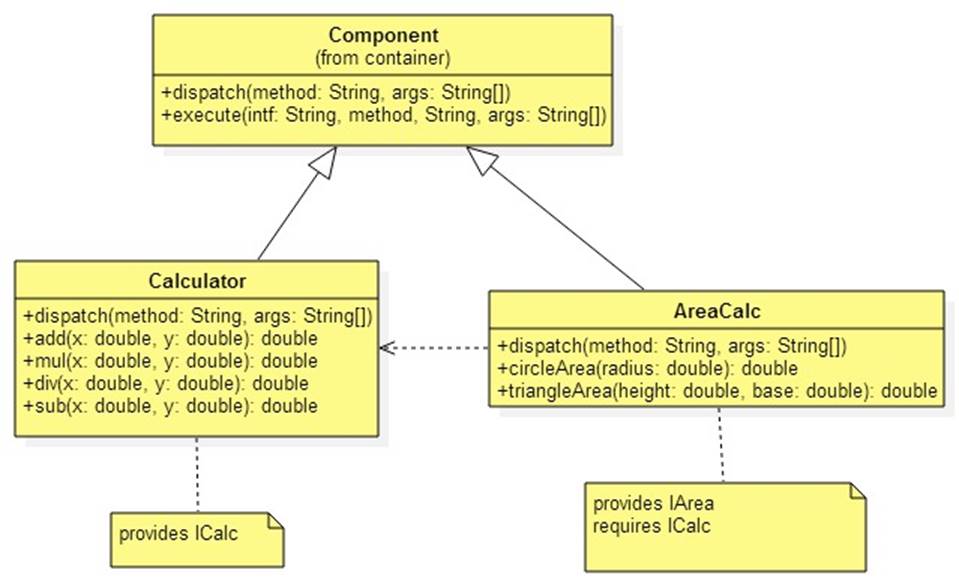
The only extra baggage is that a dispatch method must be provided and the required and provided interfaces must be defined:
Here's a sample session:
-> add 3.14 2.71
5.85
-> mul 6 7
42.0
-> div 1 7
0.14285714285714285
-> sub 1 9
-8.0
-> circleArea 10
314.1592653589793
-> triangleArea 6 10
30.0
-> fooBar 1 2 3
fooBar unavailable
-> help
Sorry, no help is available
-> quit
bye
Lab 1
The OpenApp framework consists of the following files:
Complete the implementation of the execute method in Component.java
Lab 2
Implement and test the following components:

Note: A word contains no white space characters. Use text.split("\\s+") to split text into an array of words.
Exchange your StringOps.class file with a stranger to prove your container works with third-party components.
Lab 3
A container provides discovery if it allows components and users to discover what interfaces are currently provided. Provide a discovery feature for your container class. The console should allow users to see what interfaces are provided by using the help command and the add method should warn users if required interfaces cannot yet be connected to providers.
Lab 4
Implement and test OpenApp 2.0 using Java reflection. In this version Component's execute method gets a provider from the container, as in version 1.0, then uses Java reflection to find and invoke the desired method. Thus, component developers no longer need to implement a dispatch method.