
Chapter 3
The physical, natural, and social sciences are built on the idea of systems modeling. There are several popular modeling paradigms:
functional modeling: model = function (calculus, LISP, data flow)
relational modeling: model = relation (logic, SQL, Prolog)
imperative modeling: model = finite state machine (DDS, C)
In object-oriented modeling models are objects or collaborations of objects. Object-oriented models can be used to describe real world systems (domain models) or software systems (architectural models). Not only are object-oriented domain models more intuitive than other types of models (because the real world is populated with real objects), but also, an object-oriented domain model can often be refined into an object-oriented architectural model, thus narrowing the semantic gap that exists between application domains and solution domains (= functions + data structures + instructions + files + etc.)
UML
Not surprisingly, object-oriented models appear prominently in specification and architectural documents. Today, most object-oriented models are expressed using the Universal Modeling Language (UML). UML was developed by Rational Software corporation [WWW-6] and was subsequently chosen by OMG, the Object Management Group [WWW-14], as the "industry standard" object-oriented modeling language. As such, UML replaces or incorporates several competing languages that preceded it.
Although UML describes many types of diagrams, we will only introduce and use a restricted subsets of class, package, object, and interaction (sequence) diagrams. For a more thorough treatment, the interested reader should consult [FOW-1] or any of the dozens of other books on UML that are currently available.
Objects and Classes
A class diagram shows an application's important classes and their relationships. Classes appear in these diagrams as class icons. A class icon is a box labeled with the name of the class it represents. Additional compartments show important attributes and operations:
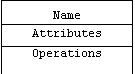
One or both of these additional compartments may be suppressed when the extra information is unavailable, premature, or unnecessary.
For example, a flight simulation program will probably want to represent airplanes as instances of an airplane class. Suppose we learn that from the flight simulator's point of view, the important attributes of an airplane are its altitude and air speed, and the important operations are takeoff(), fly(), and land(). Here's the corresponding class icon:
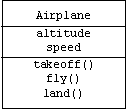
Notice that we have suppressed information about the types, visibility, and initial values of the attributes, as well as the parameters, visibility, and return values of the operations. This is often done when such information is unavailable, unnecessary, or premature.
Of course UML allows us to add this information. For example, it probably makes sense for air speed and altitude to be doubles initialized to zero. (Airplanes are created on the ground and standing still.) Suppose we decide that Airplane may eventually serve as a base class for classes representing special types of airplanes such as military planes and passenger planes. In this case we may want to make altitude and air speed protected instead of private.
Assume we also learn that the takeoff(), fly(), and land() operations are indeed parameterless and have void return values. Of course these operations should be public; however, we find out that they all need to call a supporting function called flaps(), which raises and lowers the wing flaps by a specified integer angle with a default argument of 30 degrees. Because flaps() is only a supporting function, we decide to make it private.
Finally, suppose our unit testing regimen demands that every class provide a public, static operation called test() that creates a few objects, calls a few member functions, then returns true if no errors occurred and false otherwise. Here is the class icon showing all of this added information:
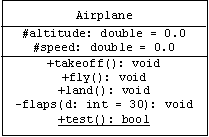
Note that UML indicates visibility using "+" for public, "#" for protected, and "-" for private. Static attributes and operations are underlined. (We use C++ types such as double, int, bool, and void for pre-defined primitive types.)
Some CASE tools (Computer Aided Software Engineering) can generate class declarations from a class diagram containing a sufficient amount of detail. Let's take a moment to consider how an idealized CASE tool might generate a Java class declaration from our Airplane class icon. Here is the format of the Airplane.java file:
/**
* Airplane.java
* Copyright (c): 2000, all rights reserved.
*/
// imports:
import java.util.*;
/**
* Instances of this class represent virtual airplanes.
* @author Pearce
* @version 1.0
*/
public class Airplane {
// see below
}
The Airplane class declaration is as follows:
public class Airplane {
/** Altitude of this airplane in feet. */
protected double altitude;
/** Speed of this airplane in knots. */
protected double speed;
// construction and finalization:
public Airplane() {
altitude = 0.0;
speed = 0.0;
}
public void finalize() throws Throwable { super.finalize(); }
// getters & setters:
public double getAltitude() { return altitude; }
public void setAltitude(double a) { altitude = a; }
public double getSpeed() { return speed; }
public void setSpeed(double s) { speed = s; }
// operations:
public void takeoff() { /* stub */ }
public void fly() { /* stub */ }
public void land() { /* stub */ }
/**
* Raises or lowers wing flaps.
* @param d = degrees flaps are to be raised or lowered.
*/
private void flaps(int d) { /* stub */ }
/**
* Raises wing flaps by 30 degrees.
*/
private void flaps() { flaps(30); }
// test driver:
/**
* Constructs and tests airplanes.
* @return <code>true</code> if successful,
* <code>false</code> otherwise.
*/
public static boolean test() { return true; }
public static void main(String[] args) {
System.out.println("Airplane.test() = " + test());
}
}
Object Icons
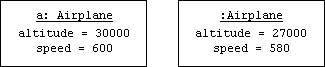
A UML object diagram shows how an application's important objects are linked together in memory at a moment of time. Objects appear in these diagrams as boxes called object icons. Like a class icon, an object icon is also a labeled box, but there's no danger in confusing the two. The first line of an object icon is the name of the object, if it has one, followed by colon, followed by the name of the class, all underlined. Subsequent lines show each attribute- in the order it was declared- with its current value:
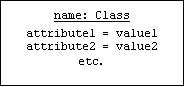
For example, assume two airplanes are created and both take off:
Airplane a = new Airplane();
a.takeoff();
(new Airplane()).takeoff();
Assume the first has reached an altitude of 30,000 feet and an air speed of 600 mph, while the second has reached an altitude of 27,000 feet and an air speed of 580 mph. Here are the corresponding object icons:
Generalization
Object oriented languages allow us to define subclasses. Instances of a subclass inherit the features of the super class. In addition, subclasses can add new features or modify inherited features.
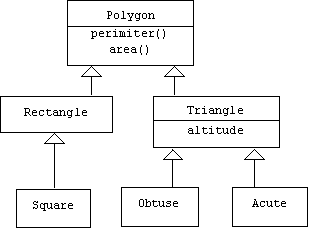
For example, a Polygon class in a graphics program provides member functions for computing area and perimeter. Triangle and Rectangle subclasses might redefine these functions using simpler formulas or add new formulas and attributes peculiar to triangles or rectangles. Obtuse and acute triangles are instances of subclasses of the Triangle class, while squares are instances of a subclass of Rectangle. In a class diagram we can express the relationship between a subclass and a super class by connecting the class icons with a generalization arrow:
In Java we can create subclasses by declaring that the features of subclasses extend the features inherited from super-classes:
class Polygon { ... }
class Rectangle extends Polygon { ... }
class Square extends Rectangle { ... }
class Triangle extends Polygon { ... }
class Obtuse extends Triangle { ... }
cloass Accute extends Triangle { ... }
As another example, assume a new release of our flight simulator program will make a distinction between military planes and passenger planes. Of course we will still need to keep track of the altitude and speed of both types of planes, and both types of planes will still need to takeoff, fly, and land. In addition, a military plane can drop bombs and has a Boolean attribute indicating if it is flying at a supersonic speed, while a passenger plane can show movies to its passengers and has an integer attribute indicating how many passengers are on board.
We could replace the Airplane class with PassengerPlane and MilitaryPlane classes, but then we would need to re-implement the takeoff(), fly(), and land() operations. Worse yet, we would need to re-implement these operations twice, once for each new class. Instead, we make the PassengerPlane and MilitaryPlane subclasses of the Airplane class. Now each new class inherits the takeoff(), fly(), and land() operations as well as the altitude and speed attributes from the Airplane super class:
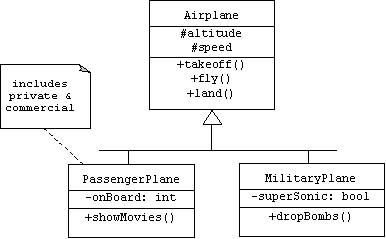
Our class diagram introduces two new features. First, instead of drawing two generalization arrows, we combined them into a single forked arrow. This makes the diagram easier to read and makes it easier to add new subclasses later. Second, we have attached a note to the PassengerPlane class icon. A note is a dog-eared box containing a comment. It has no impact on the implementation, but it can make the class diagram easier to understand.
Here are the corresponding Java class declarations:
class PassengerPlane extends Airplane {
private int onBoard = 0;
public void showMovies() { ... }
// etc.
}
class MilitaryPlane extends Airplane {
private boolean superSonic = false;
public void dropBombs() { ... }
// etc.
}
Assume we create and takeoff in one of each type of airplane:
MilitaryPlane a = new MilitaryPlane();
PassengerPlane b = new PassengerPlane();
a.takeoff();
b.takeoff();
Assume our military plane has reached an altitude of 50,000 feet and a speed of 700 miles per hour, while our passenger plane- which has 80 passengers on board- has reached an altitude of 28,000 feet and a speed of 550 miles per hour. The object diagram depicting this scenario clearly shows the altitude and speed attributes each plane inherits from the Airplane super class:
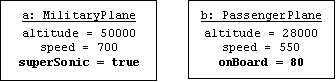
Note that the inherited attributes are listed above the subclass attributes. In fact, this corresponds to the way these objects would be laid out in memory in Java and C++. Thus, instances of MilitaryPlane and PassengerPlane literally are instances of Airplane, but with additional fields hanging off the bottom.
This last observation suggests that it is possible to write generic algorithms that are indifferent to the types of airplanes they process. Such an algorithm can use an airplane reference to refer to both military and passenger planes:
Airplane p = null;
Note that the Java compiler automatically retypes MilitaryPlane and PassengerPlane references to Airplane references. This is called an implicit upcast. The term "implicit" means the operation is performed automatically; the programmer doesn't need to tell the compiler to do it. The term "upcast" indicates that we are retyping a subclass reference as a super-class reference. Java is willing to perform upcasts because a reference to a subclass instance literally is a reference to a super-class instance.
However, the compiler rejects the last line:
p.dropBombs(); // this fails
This happens because the compiler doesn't know that p will refer to a military plane at the moment this line is executed. The compiler generates a symbol resolution error:
C:\Pearce\jlab\Airplane.java:57: cannot resolve symbol
symbol : method dropBombs ()
Of course the user can perform a static cast:
((MilitaryPlane)a).dropBombs(); // explicit downcast
An illegal static cast:
Airplane a = new PassengerPlane();
a.takeoff();
a.fly();
((MilitaryPlane)a).dropBombs();
results in a virtual machine error:
Exception in thread "main" java.lang.ClassCastException: PassengerPlane
Java programmers don't need dynamic casts because they can perform safe casts using the instanceof operator:
if (a instanceof MilitaryPlane)
((MilitaryPlane)a).dropBombs();
Links and Associations
In UML a relationship between two (or more) classes is called an association, and pairs (or tuples) of related objects are called links. For example, an on-line world atlas might represent the relationship "City X is in Country Y" and the relationship "City X is capitol of Country Y" as two associations between the class City and the class Country. In UML an association is a line segment connecting the icons of the related classes:
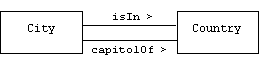
In this example we have labeled our associations with names and directions. This is the only way to distinguish an association from its inverse association in UML, although in most of our examples the distinction won't be important.
In an object diagram we represent the links "Washington D.C. is capitol of the USA," "Philadelphia is in the USA," and "Washington D.C. is in the USA" with line segments connecting object icons:
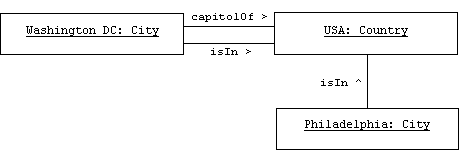
The relationship between links and associations is analogous to the relationship between objects and classes. Sometimes links are referred to as association instances.
Suppose we want to enhance our flight simulator program by allowing users to assemble and command entire fleets of airplanes. In addition, users can customize airplanes by changing the wings, engines, fuselage, and other parts. We begin by adding Fleet and Wing classes to our class diagram. We use associations to represent the relationship between a fleet and its members and the relationship between an airplane and its wings:
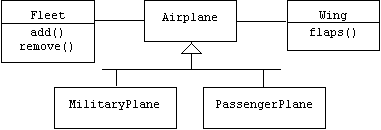
Note that it would have been inappropriate to represent these relationships using generalization, because a wing is not a special type of airplane, and an airplane is not a special type of fleet.
Association Roles
The endpoints of an association are called roles. We can add information about an association by attaching navigation arrows, multiplicities, and names to its roles.
Multiplicity
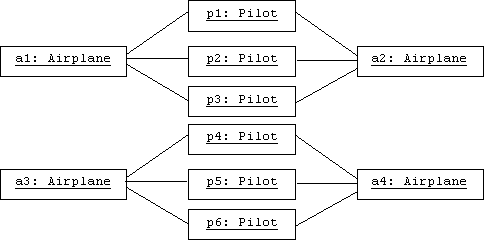
An m-to-n relationship between classes A and B relates a single instance of A to n instances of B, and relates m instances of A to a single instance of B. For example, suppose every airplane in a fleet has exactly three pilots who are authorized to fly it, and suppose every pilot is authorized to fly exactly two planes in the fleet, then the relationship "Pilot X is authorized to fly airplane Y" is a 2-to-3 relationship. In UML we can indicate the multiplicity of a relationship by labeling each role with the multiplicity of its adjacent class:

In a corresponding object diagram, we would expect to see every pilot object linked to two distinct airplane objects, and every airplane object linked to three distinct pilot objects:
If every airplane has 3 or 5 pilots who are authorized to fly it, then we can represent this multiplicity as a sequence:

If every airplane has 3 to 5 pilots who are authorized to fly it, then we can represent this multiplicity as a range:

Clearly, every wing is attached to exactly one plane, and every plane has exactly two wings, so the association between Airplane and Wing has 1-to-2 multiplicity. An airplane can only belong to one fleet at a time, but the number of airplanes that belongs to a fleet is zero or more. In UML we use an asterisk to indicate zero or more:

Navigation
An association between airplanes and wings doesn't necessarily imply that an airplane knows which wings hold it up or that a wing knows which airplane it is attached to. However, an airplane will probably need to send signals to its wings and vice-versa, so it is important that an Airplane object can quickly determine which Wing objects are holding it up, and a Wing object we can quickly determine which Airplane object it is attached to. This property is called navigability. The association between Airplane and Wing has bi-directional navigability. We can represent this by drawing barbed arrowheads at each end of the association. (Don't get creative with arrowheads. They have very specific meanings in UML.)
Clearly an object representing a fleet of planes should know which planes belong to it, but planes move from one fleet to another, and which fleet a plane belongs to will make no difference in how the plane works, so the association between Fleet and Airplane has unidirectional navigability, which UML indicates by drawing an arrowhead only on the Airplane end of the association:

In this book an association without navigation arrows is assumed to have undetermined navigability.
Navigation arrowheads can be placed on links, too. For example, the following object diagram shows a fleet containing two airplanes. Airplane a is connected to two wings, w1 and w2:
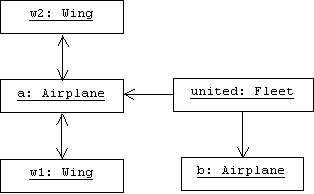
Of course the links between an airplane and its wings are bi-directional. In other words, if Airplane a is connected to Wing w1, then w1 is connected to a.
Implementing Associations
In most examples in this book we will represent links using Java references. For example, our idealized CASE tool interprets the bi-directional, 1-to-2 association between Airplane and Wing by adding two Wing references to the Airplane class:
class Wing {
private Airplane airplane;
void setAirplane(Airplane a) { airplane = a; }
public Airplane getAirplane() { return airplane; }
}
class Airplane {
protected double altitude, speed;
protected Wing leftWing, rightWing;
// getters & setters:
public Wing getLeftWing() { return leftWing; }
public Wing getRightWing() { return rightWing; }
public void setLeftWing(Wing w) {
if (w != rightWing) {
if (leftWing != null) leftWing.setAirplane(null);
leftWing = w;
if (leftWing != null) leftWing.setAirplane(this);
}
}
// etc.
}
Containers
How will our magic CASE tool represent the association between Fleet and Airplane? Of course the association is unidirectional, so we won't need to make any changes to our Airplane class. But instances of our Fleet class need to hold zero or more Airplane pointers. Placing a static array of Airplane pointers in the Fleet class will impose a maximum size on fleets and will be difficult to manage. Instead, a linked list, dynamic array, or set should be used. Several libraries include implementations of these data structures, including the standard C++ library, which provides vector<T>, list<T>, set<T>, and multiset<T> container templates as well as iterators for accessing their stored elements.
The following class diagram shows many of the interfaces and implementation classes in the new Java Collections Framework (located in java.util):
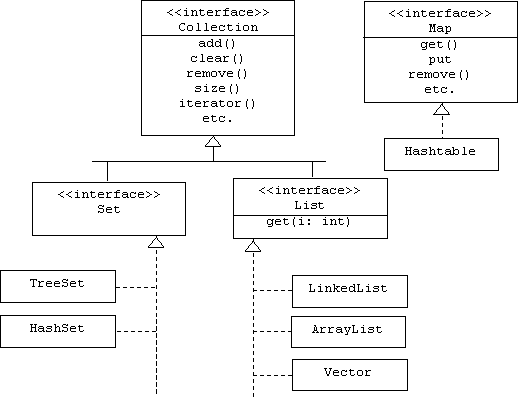
Interfaces and implementations will be introduced in the next chapter.
Basically, a set is an unordered collection with no duplicate elements, while a list is an ordered collection with duplicate elements allowed. A map is a table or dictionary. Readers should consult the online Java Tutorial for more details.
We could provide a Java Fleet with a set of Airplane references:
class Fleet {
private Set members = new HashSet();
public void add(Airplane a) { members.add(a); }
public void rem(Airplane a) { members.remove(a); }
public Iterator iterator() { return members.iterator(); }
}
A Java iterator is initialized so that it points to a "location" before the first element of its implicit argument, and provides methods for determining if there is a next element and for moving to and accessing the next element. For example, assume a fleet of three airplanes is created:
Fleet united = new Fleet();
united.add(new Airplane());
united.add(new Airplane());
united.add(new Airplane());
Here is how we would command each airplane in the fleet to takeoff:
Iterator it = united.iterator();
while(it.hasNext()) {
Airplane a = (Airplane)it.next();
a.takeoff();
}
The explicit downcast is necessary because Java collections hold Objects. Since every class implicitly extends the Java Object class, templates aren't needed.
Interaction Diagrams
By itself, an object diagram isn't very useful. It becomes much more useful when it shows typical interaction sequences between the objects. An interaction occurs when a client object sends a message or invokes a member function of a server object. The server may or may not return a value to the client.
UML provides two types of interaction diagrams: collaboration diagrams and sequence diagrams. In this book we will use sequence diagrams. At the top of a sequence diagram is a row of object icons. A life line hangs below each icon. If a and b are objects, and if a calls b.fun() at time t, then we would draw a horizontal arrow labeled "fun" that emanates from a's life line at time t, and terminates at b's life line. The exact location of time t on a life line isn't as important as its relative position. Time flows from the top of the diagram to the bottom.
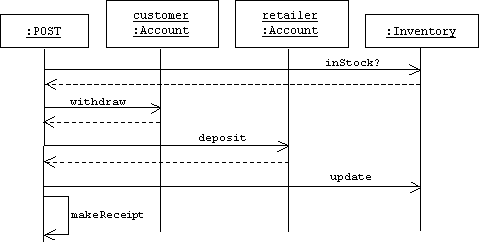
For example, assume a point of sale terminal (POST) records a sale by:
1. Checking inventory to see if item is in stock
2. Debiting the customer's account.
3. Crediting the retailer's account.
4. Updating inventory.
5. Printing a receipt.
Here is the corresponding sequence diagram:
Packages
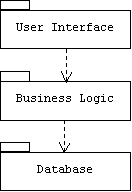
A package is a named set of related classes, interfaces, and sub-packages. A UML package diagram shows a system's important packages and their dependencies. Packages appear in these diagrams as labeled folders called package icons. A dependency is a dashed arrow pointing from an importer package to an exporter package, and indicates that changes to the exporter package may force changes to the importer package.
For example, the following package diagram indicates that components in the Business Logic package import (use) components defined in the Database package, while components in the User Interface package import components defined in the Business Logic package. Of course some of these components may have been imported by the Business Logic package, so the dependency relationship is transitive.
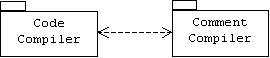
In a unidirectional dependency the exporter is also called the provider or server, while the importer is called the client. In a bi-directional dependency both packages are called peers:
Packages in Java
Java programmers place a package declaration at the top of every .java file that contains declarations of classes that are to be included in the package:
package NAME;
For example, the Query class is defined in the file Query.java and is part of the dbase package. The first non-comment line of Query.java is the package declaration:
// file: myApp\dbase\Query.java
package dbase; // package declaration
public class Query {
public Query() {
System.out.println("Constructing a query");
}
public void execute() { /* etc. */ }
// etc.
}
As the folder-shaped package icon suggests, there is a close correspondence between packages and file system directories. This correspondence is made explicit in Java. All .java files (and corresponding .class files) that belong to the dbase package reside in a directory called dbase. On my (Windows ME) system, dbase is a subdirectory of a directory called myApp, which will contain all of the packages of a mythical application called App.
The Transaction class is defined in a file called Transaction.java and belongs to the business package:
// file: myApp\business\Transaction.java
package business;
public class Transaction {
public Transaction() {
System.out.println("Constructing a transaction");
}
public void commit() { /* etc. */ }
// etc.
}
Naturally, Transaction.java and Transaction.class belong to the business subdirectory of the myApp directory.
The user interface package (ui) is more interesting. In addition to classes, it contains two sub-packages: view and control. The view package contains classes that deal with system output, while the control package contains classes that deal with system input. The name of a Java sub-package is always qualified by the name of its super-package:
PACKAGE.SUB-PACKAGE.SUB-SUB-PACKAGE.SUB-SUB-SUB-PACKAGE
For example, the Window class belongs to the ui.view package:
// file: myApp\ui\view\Window.java
package ui.view;
public class Window {
public Window() {
System.out.println("Constructing a window");
}
public void show() { /* etc. */ }
// etc.
}
While the (Message) Broker class belongs to the ui.control package:
// file: myApp\ui\control\Broker.java
package ui.control;
public class Broker {
public Broker() {
System.out.println("Constructing a message broker");
}
public void pumpMessages() { /* etc. */ }
// etc.
}
All of the ui.view files reside in the view subdirectory of the myApp\ui directory. All of the ui.control files reside in the control subdirectory of the myApp\ui directory.
The entry point for App is the main() method of the App class, which is defined in the App.java file. This class is not part of any named package. Instead, it belongs to the default package:
// file: myApp\App.java
import dbase.*;
public class App {
private Query q;
private business.Transaction t;
private ui.view.Window w;
private ui.control.Broker b;
public App() {
w = new ui.view.Window();
b = new ui.control.Broker();
t = new business.Transaction();
q = new Query();
w.show();
b.pumpMessages();
}
public static void main(String[] args) {
App a = new App();
}
}
Notice that all references to classes outside of the default package must be qualified by the full names of their packages. For example we must write:
private ui.view.Window w = new ui.view.Window();
The exception is the Query class. This appears without qualification because of the import statement at the top of App.java:
import dbase.*;
In effect, this directs javac (the Java compiler) and java (the Java VM) to search the dbase package for all classes not found in the default package.
Of course the translation from a qualified package name to a Windows or Unix path name is trivial (replace '.' by '\' or '/'), but the resulting path name is relative. How do java and javac translate a relative path name into an absolute path name? The answer is that they search for these relative paths in all directories listed in the CLASSPATH and PATH environment variables. Thus, if the absolute paths p1, p2, and p3 appear in the CLASSPATH variable, and if q is a relative path corresponding to a package name, then Windows versions of javac and java will search p1\q, p2\q, and p3\q for the corresponding .class files it requires. Usually ., the working directory is listed in PATH or CLASSPATH, so the default package will automatically be searched, too.
Setting PATH and CLASSPATH
Be careful. There are some discrepancies in this scheme from one platform to another. Some systems ignore the PATH variable. Package names are case sensitive and path names may be case sensitive. Also, make sure your PATH and CLASSPATH variables are correct. In Windows the values of these variables can be seen by typing the DOS set command to a Window's console prompt. The set command can also be used to add new paths to either of these variables:
set CLASSPATH=%CLASSPATH%;c:\java\projects;c:\java.packs
This line can also be placed in a .BAT file for convenience.
JAR Files
Exporting Classes, Methods, and Fields
Only public classes can be exported from a Java package. Within a public class, only public and protected fields and members can be accessed by importers. (Of course protected fields and methods can only be accessed by importers that extend the class.) By default, all classes, methods, and fields have package scope.
Pre-defined Packages
The Java software development kit (SDK) consists of programming tools (compiler, virtual machine, debugger, applet viewer, etc.) and a library of pre-defined classes contained in sub-packages of a single package called java. The java package contains more than twenty sub-packages. Here is a small sample:
java.io (input/output classes)
java.lang (language classes)
java.awt (user interface and graphics classes)
java.awt.event (user input classes)
java.applet (the Applet class)
java.util (utility classes)
java.net (networking classes)
javax.swing (Swing user interface classes)
javax.swing.event (Swing user input classes)